
Protect Intune against Attacks
Introduction
Microsoft Intune experienced major public interest through cyberattacks related with US Organization Stryker and Iran war.
The core issue is a "Living-off-the-Land" (LotL) technique where attackers use a company's own management software against them.
The attackers gained privileged access through hijacked Administrator accounts and abused Intune to wipe out approximately 200'000 devices.
These events highlight the critical importance of securing Microsoft 365 infrastructure, specifically by treating identity as the primary perimeter and reinforcing the security of endpoint management (MDM) platforms.

Source: America's Cyber Defense Agency & CISA / KrebsonSecurity
Key takeaways and caveats
- Identity attacks are the most common way adversaries get access to victims, therefore identity should be the key security perimeter
- Privileged accounts and Intune admin roles can severely impact your endpoint infrastructure
- Intune allows attackers to remotely wiping devices, installing harmful applications, or running malicious scripts
- Intune does not have a recycle bin or restore options for deleted devices
- Intune is not designed for managing mission-critical endpoints - as a cloud-based MDM, its primary purpose is to support standardized digital workplaces that can be redeployed at any time without causing significant business disruption
How to protect your infrastructure
1. Protect admin accounts with phishing-resistant MFA
Every privileged account should be enforced with phishing-resistant MFA. This includes Passkeys and FIDO2 security keys.
Enforce every authentication to sensible workloads with Conditional Access and an Authentication Strength to only permit phishing-resistant methods.
 Niklas Tinner
2. Use just-in-time and just-enough access for critical operations
No admin should ever be assigned with permanent Global Administrator access. Most accounts in the wild are over-privileged for their use case.
Set up Privileged Identity Management (PIM) to grant only just-in-time and just-enough access.
 Niklas Tinner
Also consider Intunes own RBAC system to granularly give permissions on different tasks in Intune, such as policy manipulation or remote actions like delete or wipe.
Additionally, anytime you assign any privileges to a group in Entra ID, enable the immutable switch "roles can be assigned to this group". With that, only Global Admins and Privileged Role Admins can add members to such a group. This prevents privilege escalation.
 Niklas Tinner
3. Leverage Multi Admin Approval
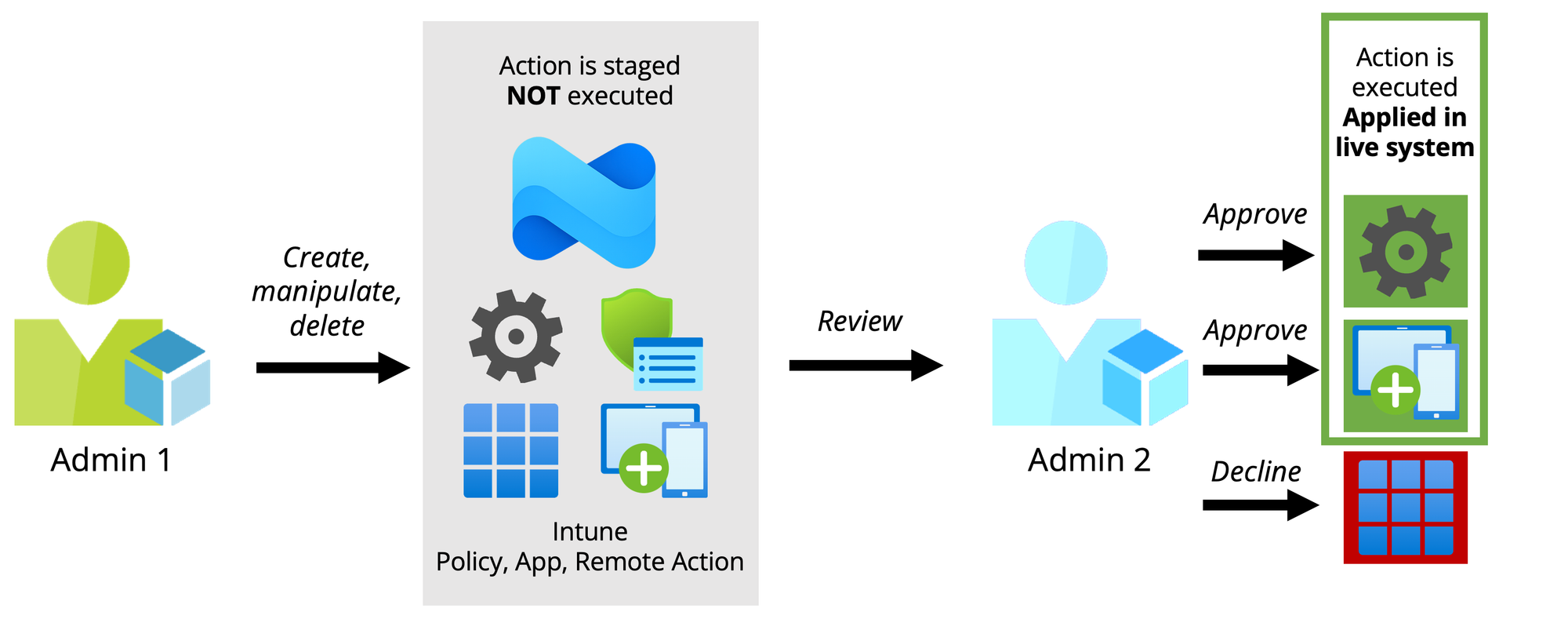
Multi Admin Approval has been in Intune for years, but flying under the radar. Essentially, it is a dual-control system, so applying admin configurations requires approval from a secondary admin before getting effective.
4. Level up Conditional Access policies with Authentication Contexts
Conditional Access should be in place for every Microsoft 365 tenant. But only few organizations use it effectively to secure critical operations such as admin interaction with management portals. Authentication Context in combination with Protected Actions and PIM should be considered!
 Niklas Tinner
5. Proactively Log & Monitor your infrastructure
Last, but not least, keep in mind that Entra ID logs and Intune logs are only collected for 30 days by default. Furthermore, analyzation and visualization capabilities remain limited.
In my opinion, storing logs in a Log Analytics Workspace for at least 180 days should be mandatory. Especially, in the case of a breach logs are the primary source to reconstruct the attack and understand impact.
 Niklas Tinner
Bonus:
This Azure Workbook from me provides a centralized solution for monitoring and analyzing audit logs to maintain full visibility over your Microsoft Intune environment. By grouping disparate event data into a single pane of glass, it enables administrators to easily track configuration changes, device operations, and identity assignments. Learn more:
 Niklas Tinner
powered by Oceanleaf
 Niklas Tinner