
Is Autopilot Device Preparation it?
Windows Autopilot is the essential technology to streamline the setup-flow of Windows 11. This is the so called "Out-of-the-Box Experience" or OOBE. Organizations use it to ensure devices are enrolled and secured in the same fashion, regardless whether the need to provision 1 or 10'000 devices. Up until now we have 2 versions of Autopilot:
- Autopilot - original version
- Autopilot Device Preparation - new version with Microsoft's full focus
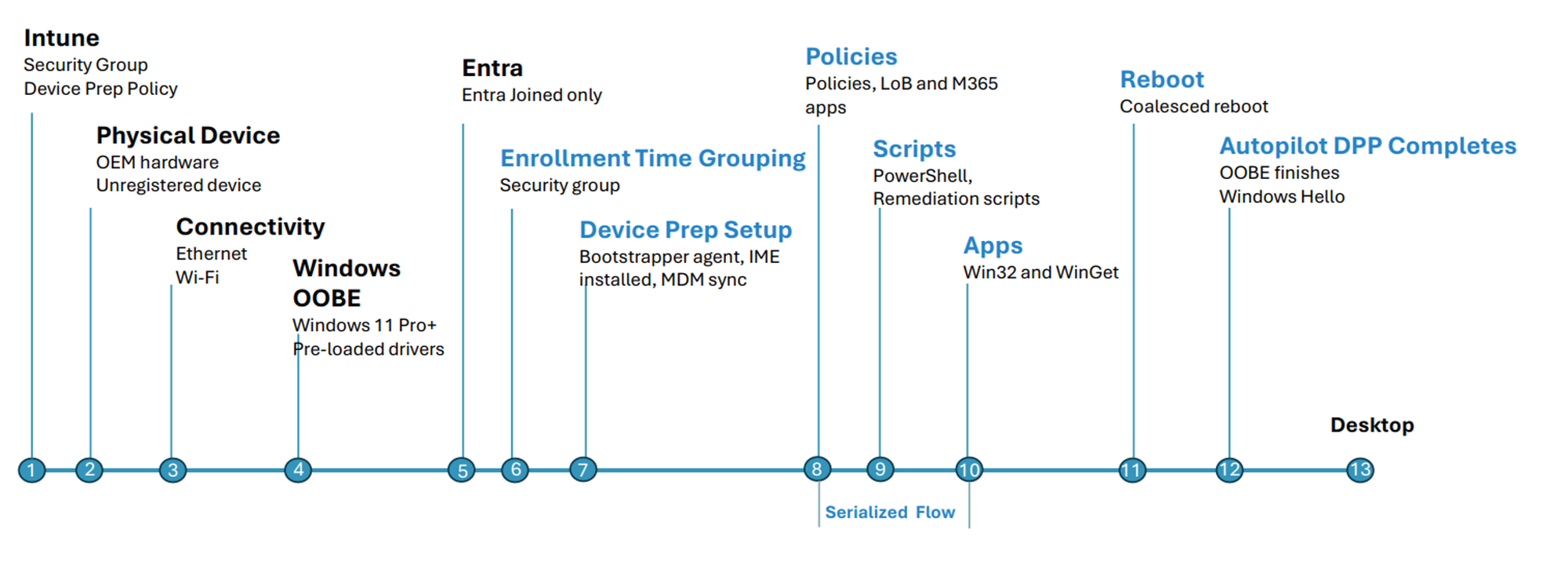
Autopilot Flow
(Device is pre-registered in Autopilot via hash, Corporate device identifier or Device Association)
- On the first OOBE start, the user signs in and the device looks up which organization/tenant it belongs to
- The device applies the enrollment policy assigned to it
- The device is joined to Entra ID
- The device is added to the enrollment time grouping group
- The device is enrolled in Intune and
- Equipped with communication/service agents
- Policies are applied
- Scripts are executed
- Defined apps are installed
- A reboot is performed (if required)
- Autopilot completes and hands over to the Windows lock screen
Comparison
| Windows Autopilot | Windows Autopilot Device Preparation | |
|---|---|---|
| Version (unofficial) | V1 | V2 |
| Release | 2017 | May 2024 |
| Supported device identities | ✅ Cloud-only (Entra ID join) ✅ Hybrid join |
✅ Cloud-only (Entra ID join) ❌ Hybrid join |
| Grouping for targeting | Dynamic groups, based on GroupTag or ZTDID | Enrollment Time Grouping, automatically via Provisioning Policy |
| Updates | ✅ Critical updates ✅ Quality updates (optional) |
✅ Critical updates |
| Number of profiles | 2 Deployment profile Enrollment Status Page |
1 Device preparation |
| Speed | ≈1x (approx. 10-15 min. with baseline apps) |
≈2x (approx. 5-7 min. with baseline apps) |
| Reliability | Okay to good | Very good! |
| Reporting | Standard reports | Improved reports |
| Device hostname naming | ✅ | ✅ Only with Device Association |
| Waits for apps before completing | ✅ | ✅ |
| Scripts during the process | ✅ | ✅ |
| Branding (company logo in OOBE) | ✅ | ❌ |
| Behaviour on Autopilot error | ❌ Process fails → state unclear, device has to be reset | ✅ Device stays usable → remaining policies and apps are still applied |
| Corporate device identification | Hardware hash (hash of the mainboard) |
Corporate device identifier (manufacturer, model, serial number) With device association, the corporate device identifier can be exported from OOBE. |
| Vendor can upload the identifier | ✅ via the Autopilot service | Can only supply a CSV file |
| Future product development | Only essential updates | Microsoft's focus |
Best Practices & Experience
Through my consulting experience, I implemented Autopilot Device Prep for the last 2 years in 99% of the environments.
The overall user experience through performance is way better and also lets orgs consider dropping Pre-Provisioning and sending the device directly to the enduser.
From a technical perspective I have the following best practices:
- Always import the Corporate Device Identifier, so Intune knows and classifies the devices as corporate-owned, when enrolling. Hardware Hash is not needed anymore.
- Ask your vendor to supply you a CSV-file with the Corp Device Identifier (Manufacturer, model, serial) when ordering masses of devices - alternatively you can also structure the CSV by yourself through minimal data transformation or ask AI to do it. You can export & download your existing records to align the right import formatting.
- For testing, you can also import the Corp Device Identifier directly from a Device in OOBE through Shift+F10 and a Powershell Session with
PowerShell

Set-ExecutionPolicy Bypass

Install-Script Get-WindowsAutopilotInfoCommunity

Get-WindowsAutopilotInfoCommunity -Identifier -Online
Limitations
Reasons to still choose classic Autopilot include mostly legacy: Hybrid Join or Windows 10 and existing process flows established through Pre-provisioning or Self-Deploying to save time.
Device Association
This newest feature, related to Device Preparation allows to link the device identity on-demand with your tenant. This is an alternative to the Corporate device identifier.
Use Cases
- On-demand enrollment & association
- Secure, cryptographic link between the device and the organizational tenant is desired (⚠️ must be removed on the device before hardware is passed along)
- Removing the association is possible with only local admin rights on the device, according to the manual
| Criterion | Corporate device identifier | Device association |
|---|---|---|
| Purpose | Mark a device as corporate-owned | Bind a device to the tenant before enrollment |
| Identifying attribute | Manufacturer, model, serial number | TPM-backed device identity, verified through attestation |
| Trust model | Unauthenticated, values can be supplied freely | Hardware-backed, cryptographically validated |
| Where it is stored | Record in the Intune tenant | Tenant affinity marker in the device UEFI, plus a record in the tenant |
| How the data is obtained | From vendor master data, without booting the device | DeviceLink CSV exported from OOBE, from Autopilot diagnostic logs, or via QR code through Graph |
| Import into Intune | CSV upload | CSV upload (pre-associate) |
| Automatic corporate marking | ✅ | ✅ |
| Device-based policy assignment | ❌ | ✅ |
| Device naming before enrollment | ❌ | ✅ |
| OOBE customization (language, keyboard, EULA, privacy) | ❌ | ✅ |
| Virtual machines | ✅ | ❌ |
| OS requirement | None specific | Windows 11 24H2 or 25H2 with KB5120998 |
| Removal | Delete the record in Intune | On the device via PowerShell + from Intune |
powered by Oceanleaf
 Niklas Tinner